A working playbook, not a portfolio
This is a working reference for turning an average deck into a board-grade one with AI — the whole pipeline, not a single prompt. It begins with the 6 → 9 method: lock the storyline and write every action title before any pixels, give each number a source or cut it, then run adversarial critique until the weak slides are gone. It is also an honest catalogue of where AI decks usually fail — generic imagery, invented facts, placeholder residue, slides that were never actually looked at — and the fix for each.
From there it maps the tools that build each piece, separating the container (PowerPoint, Google Slides, Canva, reveal.js — which also owns the transitions) from the on-page producers for diagrams, charts, maps, infographics, photography, animation and video. Every one of those producers is shown making a real Burjeel artifact on the Content page, from a live Mermaid diagram to a rendered video and a Three.js 3D scene. The upstream synthesis step — NotebookLM grounding the narrative in the source before a slide exists — sits at the front of that same page.
It points, too, at the standards worth measuring against: roughly 1,900 real consulting decks from McKinsey, BCG, Bain and Accenture, with twenty-five covers shown inline so you never have to click blind, plus a wall of editable pitch-deck templates to start from and the canon — Minto's Pyramid Principle, Zelazny's chart grammar — under the standards. And it ends with proof: the confidential Burjeel × Roche board deck, built five ways, the whole pipeline run once, end to end. Point it at a deck and it applies all of it.
The 6 → 9 method
A 9/10 deck is never one prompt. It is a pipeline — research, critique, redesign, critique — with a tool at each stage. This is how LLMs and tools actually get there:
Why LLM decks usually disappoint — and the fix
The same failures show up on almost every AI-built deck. Each one is a process gap, not a model limitation — which is why a better prompt rarely solves it but the loop above does. This is the checklist the method is built to defeat.
Generic AI imagery
Decorative, uncanny, off-brand pictures bolted on for "visual interest." Fix: real licensed stock, real charts and real maps — AI photo only for controlled character/scene work.
Confident wrong facts
Invented numbers and wrong titles (we caught a CEO/Chairman slip live). Fix: ground every claim in a named source; verify before it ships.
Placeholder residue
"hello@reallygreatsite.com", lorem ipsum and stray template doodles left in. Fix: scrub every default; nothing the author didn't write survives.
Cropped, decapitated images
Landscape photos jammed into portrait frames, cutting off heads and labels. Fix: aspect-aware crops, or full-bleed with a scrim.
Bullet soup, no action titles
Walls of text and topic labels ("Market Overview") instead of arguments. Fix: one idea per slide, a sentence headline that states the point.
Design drift
Fonts, spacing and colour wander slide to slide. Fix: one locked type/colour system applied by script, not by hand.
"Looks done" — never actually viewed
The model signs off from intent, not the rendered slide, so cropped/empty/ugly slides ship. Fix: render every slide and look at it before calling it done.
No loop, no rollback
One-shot generation you can't refine or revert. Fix: version every pass, compare, roll back — the loop is the unlock.
The AI slide-development toolkit
Separate the two layers. The container assembles pages and owns the transitions between them; the producers make what sits on a page, by content type. Most "AI deck" tools blur the two — keeping them apart is what lets you reach for the right one. ✅ = wired in and used here; ◆ = world-class, callable. See each producer make a real Burjeel artifact →
Research & narrative synthesis — the upstream step before any slide
NotebookLM
Load every source document; it answers, outlines and briefs strictly from them — citation-anchored narrative with no hallucination. No slide export and no API, so it's the content step, not the build step: synthesise the story here, then author it with the tools below.
notebooklm →Gemini / GPT Deep Research
Multi-source web research with citations to assemble and stress-test the evidence base before a single slide is built.
gemini →Claude + connectors
Pulls the source PDF, the web data and the vault together into the outline and the action-titled narrative this deck was built from.
claude.ai →The container / assembly layer — holds the pages, owns the transitions
Where slides live and get assembled. Slide-to-slide transitions (Morph, Magic Move, reveal.js) live here — the one content type that belongs to the container, not a producer.
python-pptx / pptxgenjs
Scripted .pptx — pixel control, charts, master layouts. How the case-study deck was built.
docs →Workspace MCP
Create & edit native Google Slides programmatically, shareable in your Drive.
Slides API →Canva MCP
Generate designs, autofill brand templates, export — type + brand-kit composition.
canva.com →HTML → Express
Author pixel-controlled HTML, import as an editable Express document.
express →reveal.js / Slidev
Code-native HTML decks, deployable to a URL, fully themeable in CSS.
revealjs.com →Gamma
Prompt-to-deck/site generation with an API; fast first drafts to refine.
gamma.app →Beautiful.ai · Pitch · Tome
Template-intelligent AI deck builders; strong for speed and consistency.
beautiful.ai →On-page producers — by content type — ten types, one lead tool each
What actually goes on a page. Each links to a live, real example built for the Burjeel deck. See them all on the Content page →
Rendered MP4 · Runway · Synthesia
Motion clip or AI presenter, embedded on the slide. see it made →
The deeper bench — charts & data-viz
Datawrapper
Publication-grade charts/maps/tables; full REST API to batch-create.
datawrapper.de →Flourish
Animated, story-driven charts; Live API to drive any template.
flourish.studio →Plotly / matplotlib
Python charts from a CSV. Built the case-study needs-vs-supply matrix.
plotly →Observable Plot / D3
Concise JS charts (Plot) or fully bespoke (D3). Maximum control.
observable →Vega-Lite / ECharts
One JSON = one chart — ideal for auto-generated, AI-specified viz.
vega-lite →RAWGraphs
Alluvial, beeswarm, bump, treemap — the charts other tools skip.
rawgraphs.io →Diagrams & maps
Mermaid
Flowcharts, sequence, ERD, Gantt from code. Wired in — see the live PPPP money-flow on the Content page.
mermaid.js →draw.io / diagrams.net
Pro flowcharts, cloud/network architecture, UML, BPMN.
diagrams.net →geopandas + Plotly
Scripted choropleth & bubble maps. Built the case-study investment map.
geopandas →Datawrapper · Mapbox · Felt
No-code choropleths to custom vector maps and collaborative GIS.
mapbox →Imagery, icons & stock
Higgsfield
Unlimited-tier character/scene stills. Generated the case-study photography.
higgsfield.ai →OpenAI gpt-image-1
In-image text and photo edits/composites — the leg Higgsfield doesn't cover.
docs →Pexels (live) · Unsplash · Pixabay
Real licensed photography via API. Pexels keyed & live; Unsplash/Pixabay queued.
pexels API →Lucide · Phosphor · Tabler
Open, consistent icon families (Phosphor: 9k icons, built for decks).
phosphor →Design systems & CSS you can lift
Tailwind · Open Props
Drop-in design tokens & utilities for HTML/reveal decks and microsites.
open-props →Pico.css
Class-light semantic CSS — instant clean typography for doc-style decks.
picocss.com →100+ templates you can use & change
A working catalogue — 72 Slidesgo themes, 20 Pitch decks, Figma & Canva libraries — each tagged by how the toolchain edits it: drive it directly through an MCP, or download and rebuild. Browse all 102 →
The standards — 20 board-grade exemplars
The canon isn't a pile of templates — it's a handful of sources that generate good slides, plus the real decks that prove the point. Links go to the best public home for each.
Minto — The Pyramid Principle
Governing thought on top, MECE support below. The grammar of every consulting deck.
barbaraminto.com →Zelazny — Say It With Charts
Pick the chart from the message: comparison→bar, trend→line, composition→stacked.
The reference →SCQA + the ghost deck
Sketch every slide as a one-line title before building a pixel.
Worked examples →The "so-what" headline
The title states the insight, not the topic. Read the headlines alone and you've read the deck.
See it applied →Airbnb — seed deck (2009)
The deck that shaped all pitch decks: one idea per slide, ruthless brevity.
View the deck →Uber — pitch deck (2008)
Dense market logic made legible; a masterclass in sequencing.
In the collection →Sequoia — pitch deck template
The canonical 10-slide skeleton VCs expect. The default to bend, not break.
sequoiacap.com →Dropbox — seed deck
A simple product, a clear wedge, a believable path to scale.
In the library →LinkedIn — Series B (annotated)
Reid Hoffman's deck with the reasoning behind every slide. A teaching artifact.
reidhoffman.org →McKinsey Global Institute
Exhibit-led pages: one chart, one takeaway, sourced footers.
mckinsey.com/mgi →BCG Henderson Institute
Concept diagrams that carry an argument — the schematic as the slide.
bcg.com →Bain — strategy decks
Tight executive summaries; the answer-first page that respects a board's time.
bain.com →Stripe annual letters
Prose-and-chart hybrids — land a complex point without bullet soup.
stripe.com →Slidebean — 35+ startup decks
Annotated, downloadable real decks from funded companies.
slidebean.com →Figma — 34 pitch deck examples
Modern, design-led examples with the why behind each layout.
figma.com →Visme — 18 funded decks
Real decks that closed rounds, grouped by what each did well.
visme.co →Duarte — Resonate / slide:ology
Story structure for presentations: tension and resolution, not a list of facts.
duarte.com →A real board deck, rebuilt end-to-end
A confidential 13-slide strategy deck — half of it AI-generated narrative — re-cut to eleven action-titled slides: real photography, every figure sourced, the model and money in clean data-viz. The original asked the board to back a continental rollout; the rebuild asks for one small, reversible pilot, and proves every step.


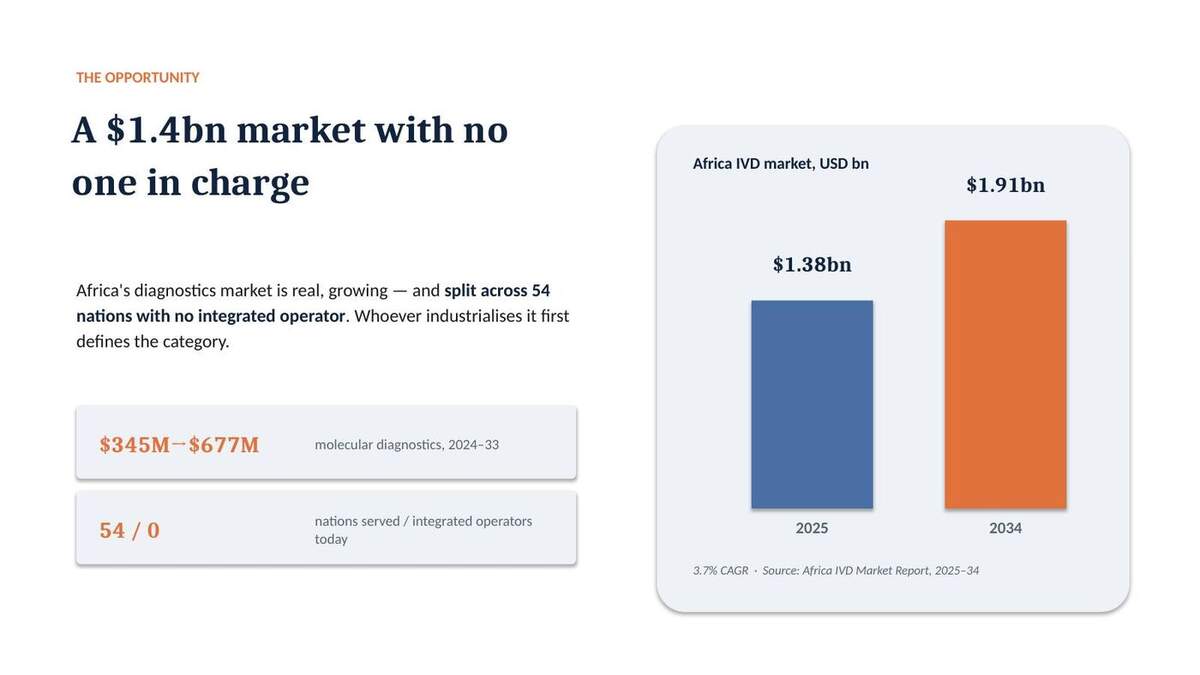
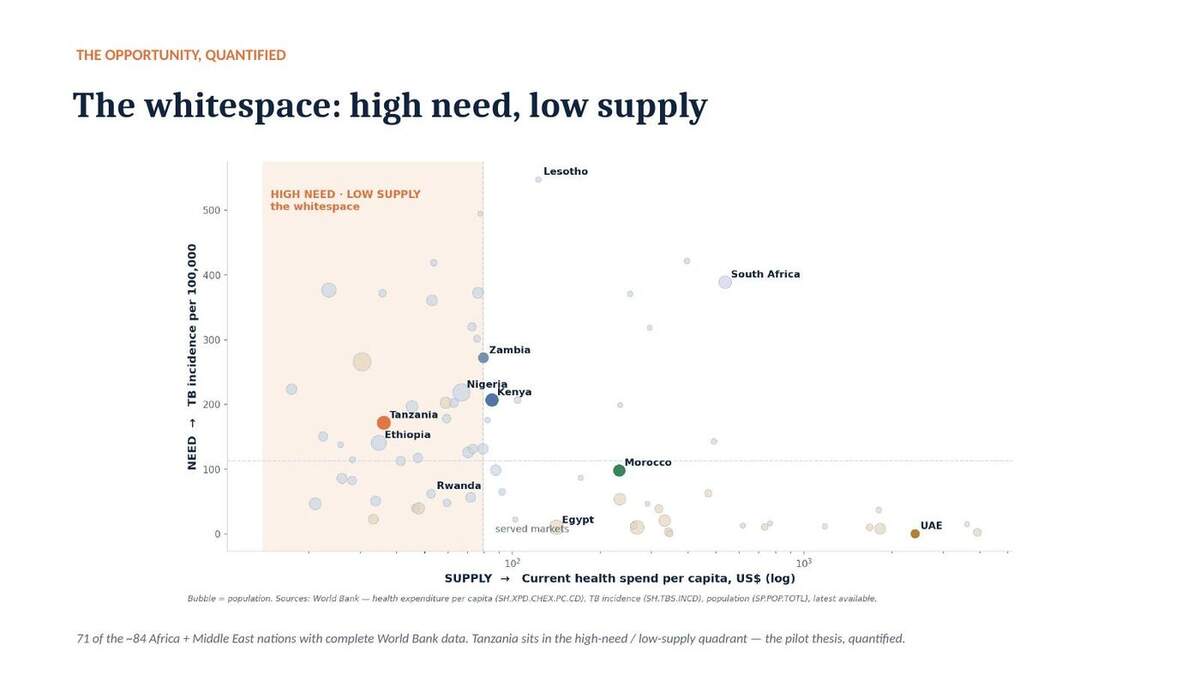
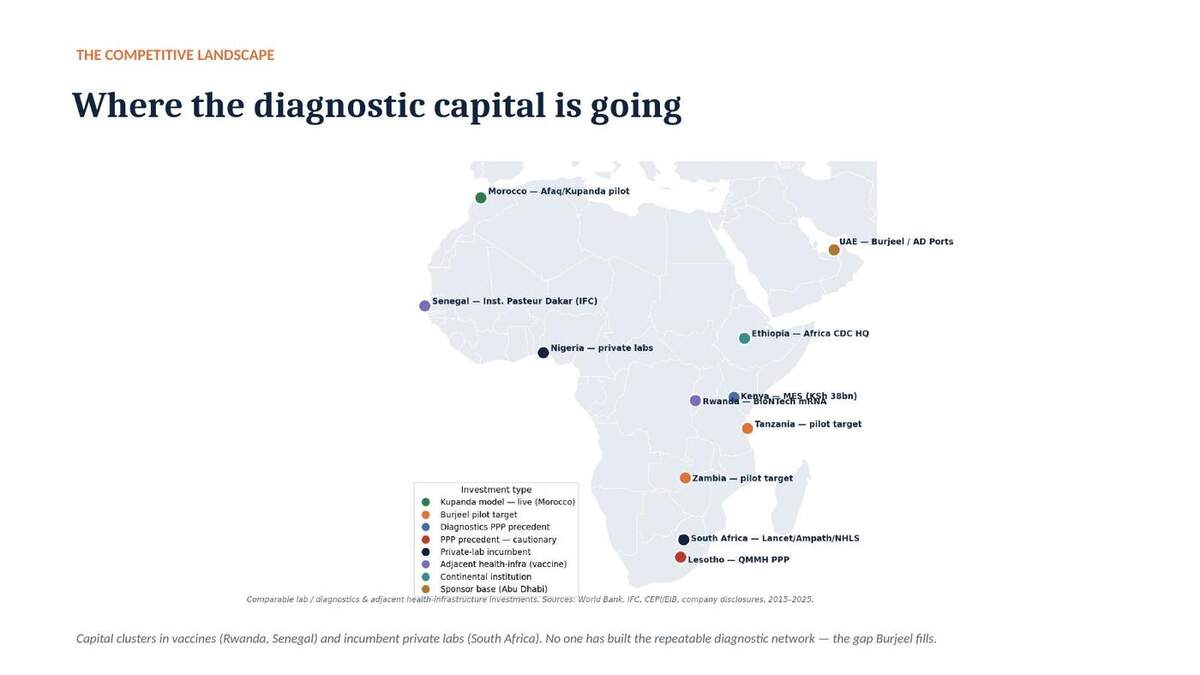
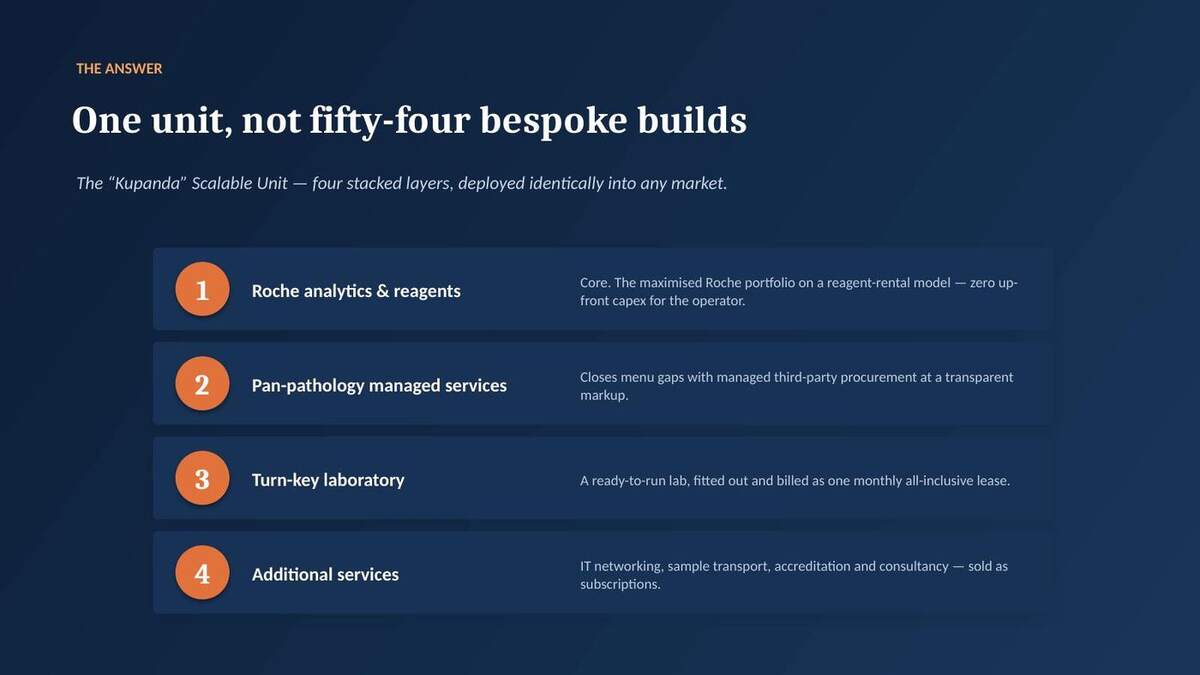
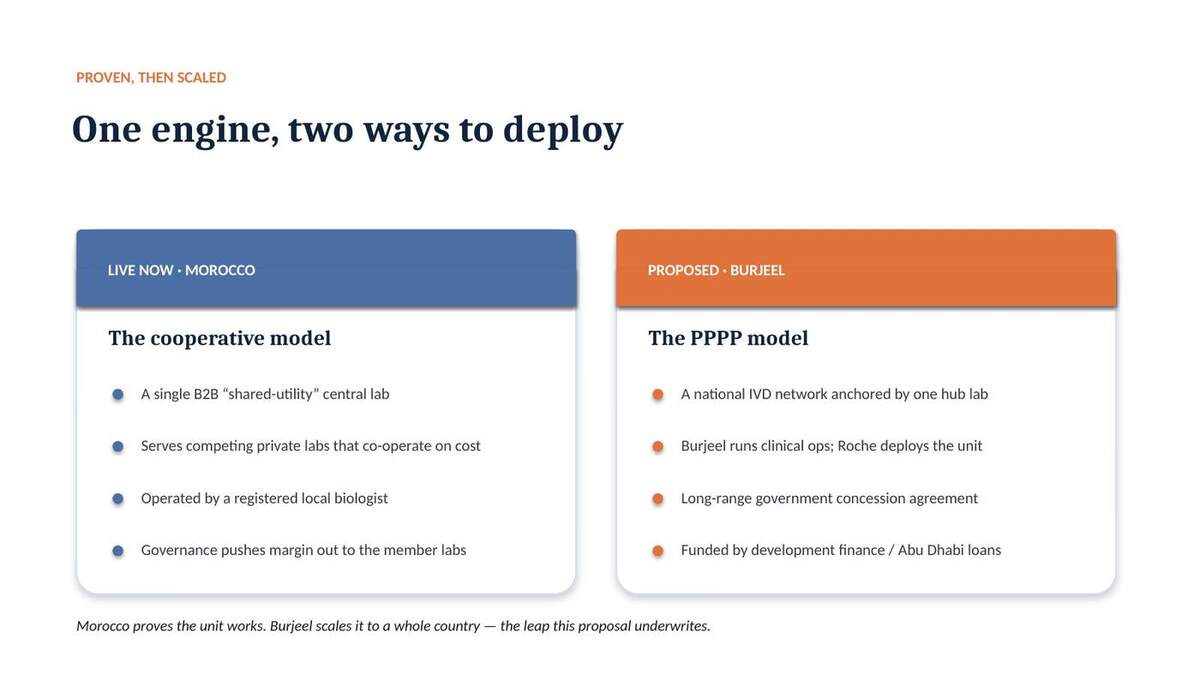
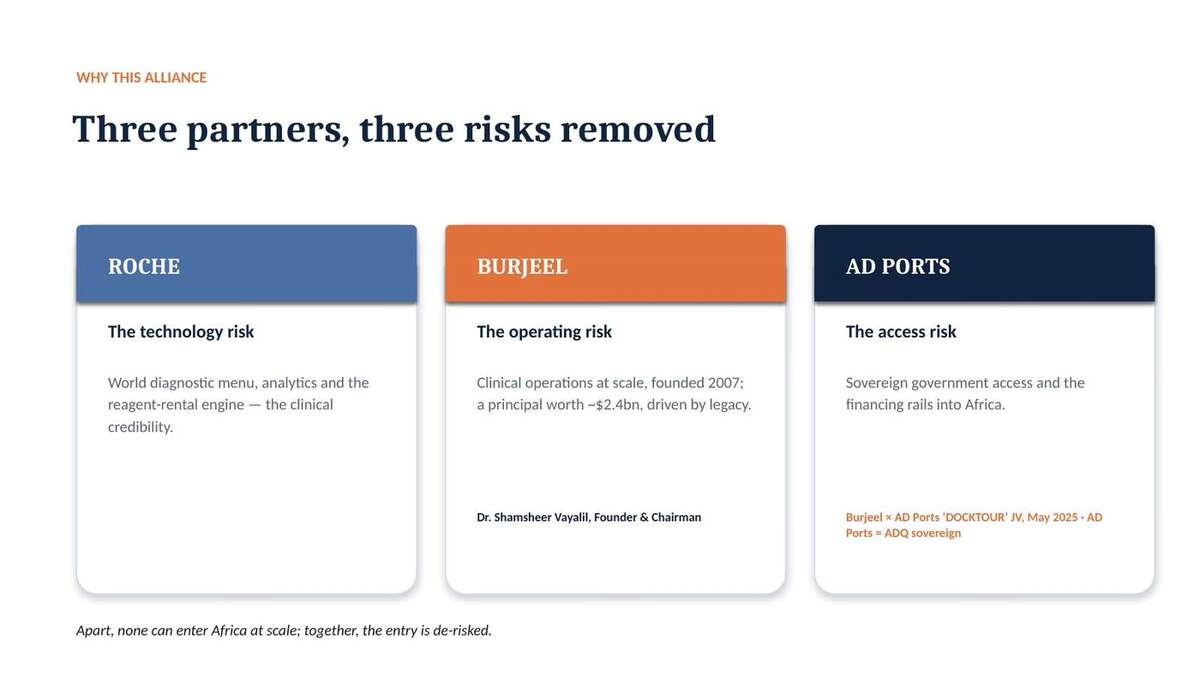
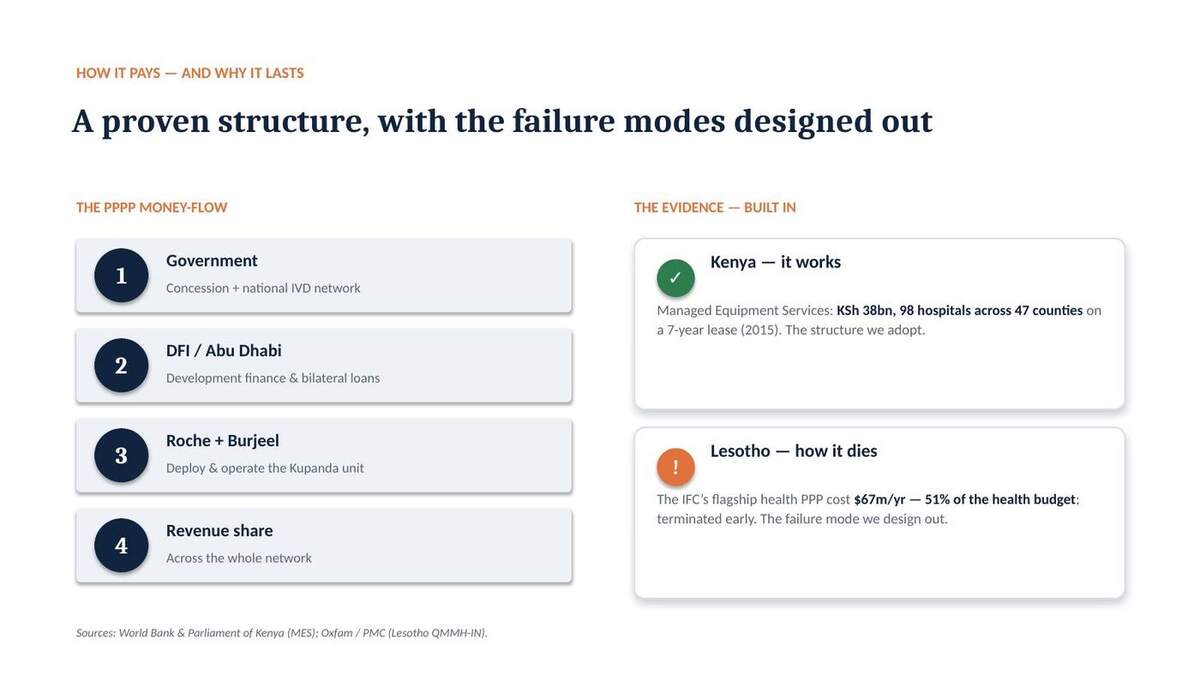
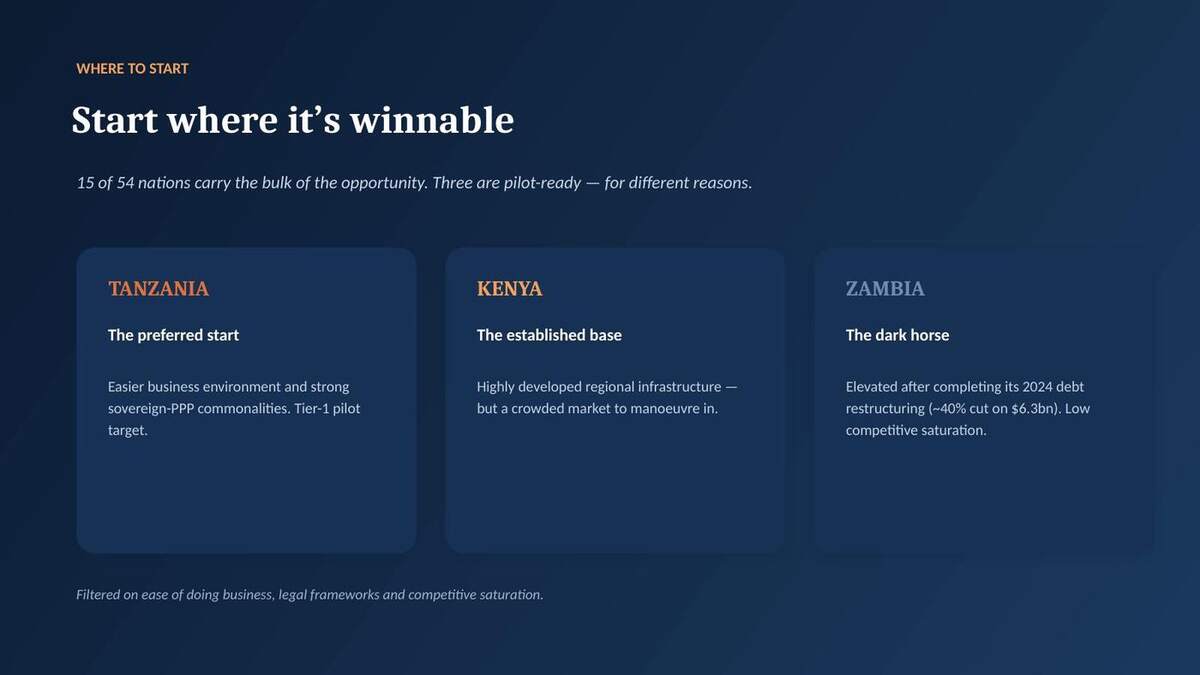

↓ Download the editable .pptx → Eleven slides, real photography, two data slides from live World Bank data, every figure sourced; three headline options in each slide's speaker notes.
Before / after
| Original (13 slides) | Rebuild (11 slides) |
|---|---|
| ~7 of 13 slides AI-generated in NotebookLM — scaffolding presented as strategy | Every slide purpose-built; the genuine model kept, the filler cut |
| Topic titles ("The Vision", "Four Levels of Impact") | Action titles — the headline is the argument |
| Claims asserted, unsourced ("15 nations = 80%") | Sourced or cut; Kenya MES & Lesotho QMMH added as real, costed precedents |
| Empty stat slides, no imagery | Dense sourced factoids + real photography on the human slides |
| Ask: back a continental rollout | Ask: one reversible 12-month pilot with a single Go/No-Go |
The data that lifted it
A note on confidentiality
The source material was marked strictly internal — highly confidential. This page is noindex and unlisted, but reachable by anyone with the link. Treat the URL as sensitive — say the word to password-gate it or swap in a sanitised dummy.